 MindForger
Docs
MindForger
Docs
Getting Started
Getting started with MindForger.
Basics

This section aims to explain MindForger basics:
- from Note to Notebook shelf (animation)
MindForger terminology:
In short:
- The MindForger workspace is like the desktop of an office desk.
- The MindForger notebook shelf is like a bookshelf where you put and organize your (note)books.
Let's describe basic terms in more detail.
Notebook shelf
MindForger notebook shelf:
- is where you organize notebooks - for instance work, hobbies, research.
- imagine taking the notebook from notebook shelf to read it and write to it
- stored in a file on the filesystem
Workspace

MindForger workspace:
- contains notebooks
- stored in a directory on the filesystem
- has its own configuration
- might be empty
Notebook

MindForger notebook:
- contains notes
- organizes notes in hierarchy - outline
- can be marked with tags
- is typically devoted to a specific topic such as a project plan, family gifts or lessons learned
Note

MindForger note:
Create Workspace
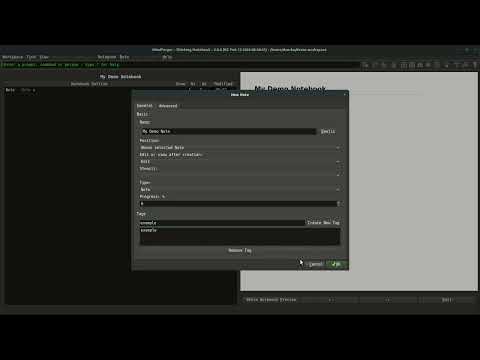
Create new workspace as follows:
- open menu
Knowledge - choose
Newmenu item - choose
Workspacesub-menu item New Workspacedialog is opened: - type in workspace name - feel free to modify where to store the workspace on the filesystem- click New to create the workspace
Create Notebook
Create new notebook as follows:
- open menu
Notebook- 💡 if
Notebookmenu is disabled, then open list of notebooks (menuView/Notebooks) or notebooks tree (menuView/Notebook Shelves)
- 💡 if
- choose
Newmenu item New Notebookdialog is opened: - type in notebook name - feel free modify notebook creation options and tags- click OK to create the notebook
Create Note
Create new note as follows:
- open menu
Note- 💡 if
Notemenu might is disabled, then open the notebook in which you want to add the note
- 💡 if
- choose
Newmenu item New Notedialog is opened: - type in note name - feel free modify note creation options and tags- click OK to create the note
Edit Note
When you are viewing a note, you can edit it using one of the options below:
- Double click the mouse preview.
- Use Ctrl-e keyboard shortcut (Linux/Win).
- Use Alt-n e keyboard shortcut (Linux/Win).
Once you finish editing the note you can save it and preview using one of the options below:
- Use Alt-⬅ keyboard shortcut.
- Click Save & Leave button at the bottom of the editor.
Fix Grammar with Wingman
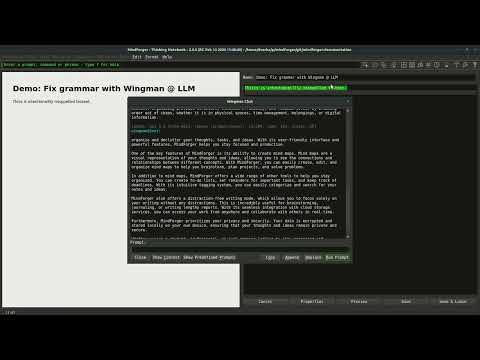
Wingman is MindForger's private AI assistant which runs a large language model on your computer - to set it up see LLM provider configuration. While you are editing a note, you can fix grammar of the text as follows:
- select a text withing the note editor
- open Wingman chat window using Ctrl-/ (Linux/Win)
- specify prompt:
- custom prompt: type in
Fix grammar: #TEXT(#TEXTis replaced by the text you selected in the note editor) - predefined prompt: choose
Fix grammar: #TEXTfrom the drop down
- custom prompt: type in
- click
Run - check LLM model answer
- if you are satisfied, then click
Replaceand the fixed text from the Wingman chat window will replace the text in the note
... Wingman can do much more:
- complete sentences, paragraphs or portions of the text
- reformulate / rewrite the text - formally, informally, in a slang, like a person (Kafka), etc.
- provide synonyms and antonyms
- explain
... and much more - for more details see Wingman.
Notes Outliner
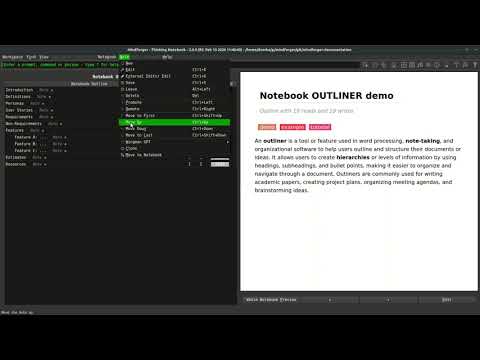
An outliner is a feature used in word processing, note-taking, and organizational software to help users outline and structure their ideas. Outlining actions in MindForger allow users to create hierarchies or levels of information by, making it easier to organize and navigate through a Notebook:
- open a notebook
- choose and view a note in the note tree
- open menu
Note - choose one of the outlining actions
Promote- to move note one level up in hierarchy (depth)
Demote- to move note one level down in hierarchy (depth)
Move to first- move note to the first from the top on its level (depth)
Move up- move note one position up on its level (depth)
Move down- move note one position down on its level (depth)
Move to last- move note to the last from the top on its level (depth)
Outlining is a powerful tool that allows you to organize your thoughts and make your remarks structured, comprehensible, and scalable.
Find Note
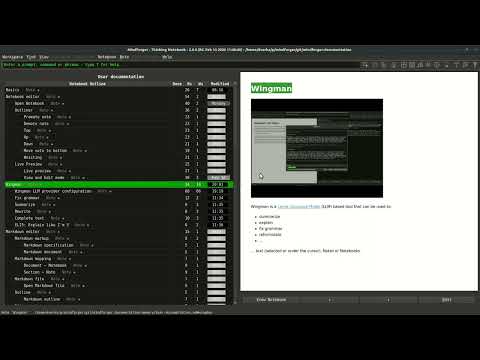
You can find notebooks and notes using the following attributes:
- name
- text phrase
- tag
For instance, to find notes by text phrase:
- open menu
Find - choose
Full-text Searchmenu item Searchdialog is opened: - type in search phrase- click Search to search for notes containing the phrase
- preview and select a note to open in the search results
Similarly, for other search options.
Delete Notebook
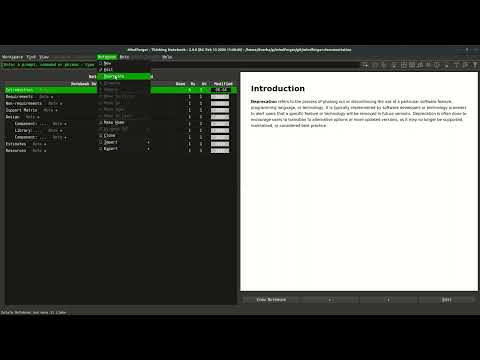
Notebook can be ~~deleted~~ deprecated as follows:
- open the notebook you want to delete (be sure that you are not editing a note)
- open menu
Notebook - choose
Deprecatemenu item Deprecate Notebookdialog is opened- click Yes to deprecate the notebook
As you can see, notebooks in MindForger are not deleted, but deprecated - they are moved to a limbo directory. To purge or resurrect deprecated notebook:
- open menu
View - choose
Limbomenu item - use you file manager to manipulate the notebook
Video tutorials
MindForger video tutorials:
- 🎞 playlist on YouTube
🎞 MindForger: From Markdown editor to thinking notebook
🎞 MindForger: First steps